Book a demo call
Pick a free slot. In 30 minutes we show you just IDM live — guided by your questions, not by a slide deck.
Book a call
Scheduling via Microsoft Bookings
The role model is the heart of just IDM: describe once what a role means — which access groups, teams, mailboxes and which license belong to it. From then on, you maintain roles, not groups.
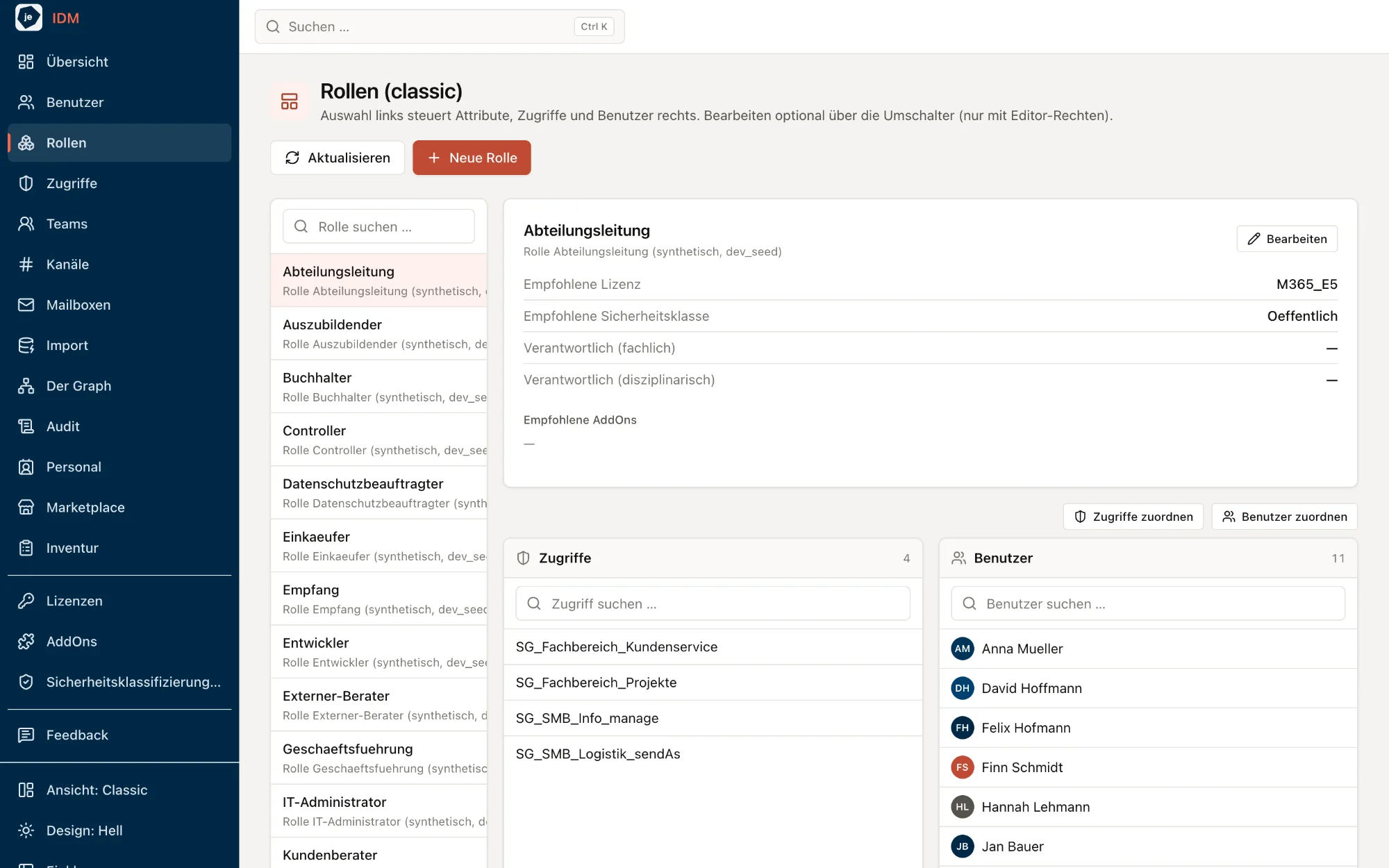
A role bundles access, teams, mailboxes and the license recommendation. Change the role, and everyone carrying it changes with it — memberships are computed, not maintained by hand.
Department move, reorganization, new project: give or revoke a role for many people at once — in seconds, not in ticket loops.
Every role knows its recommended license, add-ons and security classification — and who owns it. New employees start fully equipped.
Access groups that teams, channels or mailboxes still point to cannot be deleted. Orphaned permissions never come into existence.
Two ways in, one goal: talk to us for 30 minutes — or try it yourself right away.
Pick a free slot. In 30 minutes we show you just IDM live — guided by your questions, not by a slide deck.
Scheduling via Microsoft Bookings
just IDM runs with sample data at demo.justidm.app. Simply sign up and explore — no installation, no obligation.
Prefer to write to us? idm@justexperts.de
30-minute call · demo environment with sample data · no obligation